Architecture Overview
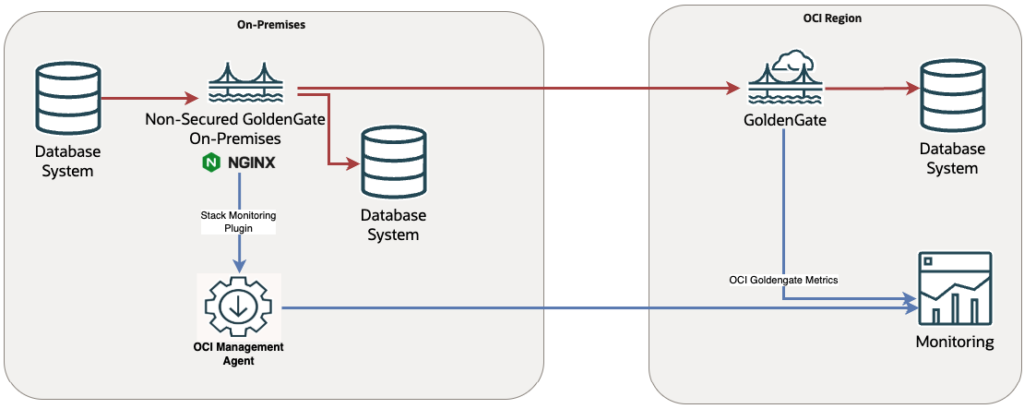
In this use case, Oracle GoldenGate runs in an on-premises environment and is monitored using Oracle Cloud Infrastructure (OCI) Stack Monitoring, providing centralized visibility into GoldenGate deployments, services, replication processes, and their operational health. OCI Stack Monitoring provides native support for discovering and monitoring Oracle GoldenGate Microservices Architecture components. This integration enables GoldenGate environments to be monitored directly through OCI Observability & Management services.
In a replication environment where both on-premises Oracle GoldenGate and OCI GoldenGate deployments are used within the same project, this architecture provides a unified monitoring environment for both platforms. This enables observability and management tools to monitor, analyze, and manage replication operations from a single pane of glass.
Why Is a Reverse Proxy Required?
OCI Stack Monitoring supports discovering and monitoring Oracle GoldenGate Microservices Architecture deployments through HTTPS endpoints. For the on-premises GoldenGate configured without native HTTPS security, we can introduce an NGINX reverse proxy. It provides an HTTPS entry point that OCI Stack Monitoring can use for discovery and metric collection, while the underlying GoldenGate deployment remains unchanged.
- KB101098 Configuring and Securing Oracle GoldenGate Microservices with NGINX Reverse Proxy For Non-Secured Deployments
- https://docs.oracle.com/en/database/goldengate/core/26/coredoc/secure-configure-reverse-proxy-nginx-access-oggma.html
In this hands-on lab, we demonstrate how to configure this architecture using Oracle GoldenGate 21.20, NGINX, and OCI Stack Monitoring.
Hands-On Lab
Prerequisites
- Non-secured Oracle GoldenGate Microservices Architecture is installed, configured, and running in the on-premises environment.
- Refer to KB60548 to validate if your environment is supported by OCI Stack Monitoring.
- The Oracle Management Agent is installed on the host running Oracle GoldenGate Microservices Architecture. The Stack Monitoring plugin is deployed.
- OCI Stack Monitoring service requirements are completed.
Lab Setup
- Host: ogglab x86-64 mini PC
- OS: Oracle Linux 9
- Installed GoldenGate: Non-secured Oracle GoldenGate 21.20.0.0.0
- Environment
- OGG_HOME=/opt/app/ogg/orcl21c01
- OGG_ETC_HOME=/opt/app/ogg/deployments/sm04/etc
- OGG_VAR_HOME=/opt/app/ogg/deployments/sm04/var
- Deployments
- Service Manager SM04 (/opt/app/ogg/deployments/sm04)
- ORCL02 (/opt/app/ogg/deployments/orcl02)
- Services
- Service Manager: http://ogglab:16030
- Administration Service: http://ogglab:16031
- Distribution Service: http://ogglab:16032
- Receiver Service:http://ogglab:16033
- Performance Metrics Service:http://ogglab:16034
- Environment
Set Up Keys, Certificates, and a Truststore
I use a personal mini PC with IP address 192.168.1.95 to host GoldenGate. I added the following entry to /etc/hosts to resolve the hostname ogglab locally. This hostname is also used as the Common Name (CN) and DNS Subject Alternative Name (SAN) in the server certificate.
/etc/hosts
192.168.1.95 ogglab
I generate a TLS certificate for the NGINX reverse proxy. The truststore.jks is created for OCI Stack Monitoring plugin.
cd /opt/app/ogg/security/sm04
openssl req -subj "/CN=RootCA" -newkey rsa:2048 -nodes -keyout rootCA_key.pem -new -x509 -days 3650 -out rootCA_cert.pem
openssl req -subj "/C=ES/O=OGGLab/CN=ogglab" -newkey rsa:2048 -nodes -keyout ogglabsm04_key.pem -new -out ogglabsm04.csr

$ cat ogglabsm04_cert.cnf
extendedKeyUsage = serverAuth
subjectAltName = DNS:ogglab,IP:192.168.1.95

openssl x509 -CAcreateserial -CA    rootCA_cert.pem -CAkey rootCA_key.pem -req  -in  ogglabsm04.csr -extfile ogglabsm04_cert.cnf -days 3650 -out ogglabsm04_cert.pem

# Be sure that OCI Management Agent must have read permission on the truststore and traverse permission on its parent directories.
keytool -importcert -storetype JKS -keystore truststore.jks -alias rootca -file rootCA_cert.pemSet Up Reverse Proxy (NGINX)
This configuration provides HTTPS connectivity between the OCI Management Agent and the NGINX reverse proxy. NGINX terminates the TLS connection and forwards requests to the existing GoldenGate services over HTTP. To minimize security risks, access to the underlying HTTP endpoints should be restricted to the local host or a trusted network.
# Install NGINX
sudo dnf install nginx
sudo systemctl start nginx

# Generate the NGINX reverse proxy configuration
cd $OGG_HOME/lib/utl/reverseproxy
./ReverseProxySettings -u admin -P 'YOUR_PASSWORD' -p 443 -o /tmp/ogg.conf http://localhost:16030
sudo cp /tmp/ogg.conf /etc/nginx/conf.d/nginx.conf

# Create the combined PEM file expected by your auto-generated proxy configuration
cd /opt/app/ogg/security/sm04
sudo sh -c 'cat ogglabsm04_cert.pem ogglabsm04_key.pem > /etc/nginx/ogg.pem'
sudo chown root:root /etc/nginx/ogg.pem
sudo chmod 600 /etc/nginx/ogg.pem

# Verify the certificate and key are present
sudo grep -nE '^-----BEGIN ' /etc/nginx/ogg.pem
1:-----BEGIN CERTIFICATE-----
21:-----BEGIN PRIVATE KEY-----

# Test configuration and apply
sudo nginx -t
  nginx: the configuration file /etc/nginx/nginx.conf syntax is ok
  nginx: configuration file /etc/nginx/nginx.conf test is successful

sudo nginx -s reload
sudo systemctl enable nginx

# Test the HTTPS endpoint with certificate validation
curl --cacert rootCA_cert.pem https://ogglab/After configuring NGINX, services can be accessed through paths under the same HTTPS endpoint:
- Service Manager: https://ogglab
- Administration Service: https://ogglab/services/ORCL02/adminsrvr/v2/content/index.html
- Distribution Service: https://ogglab/services/ORCL02/distsrvr/v2/content/index.html
- Performance Metrics Service:https://ogglab/services/ORCL02/pmsrvr/v2/content/index.html
- Receiver Service:https://ogglab/services/ORCL02/recvsrvr/v2/content/index.html
Check Performance Metrics Service
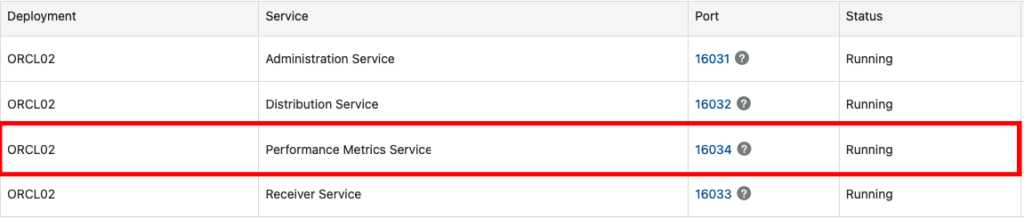
Verify that the Performance Metrics Service is enabled and running. OCI Stack monitoring uses this service to extract the metrics.
OCI Stack Monitoring GoldenGate Discovery
Before proceeding with discovery, you should be sure that all required prerequisites are completed.
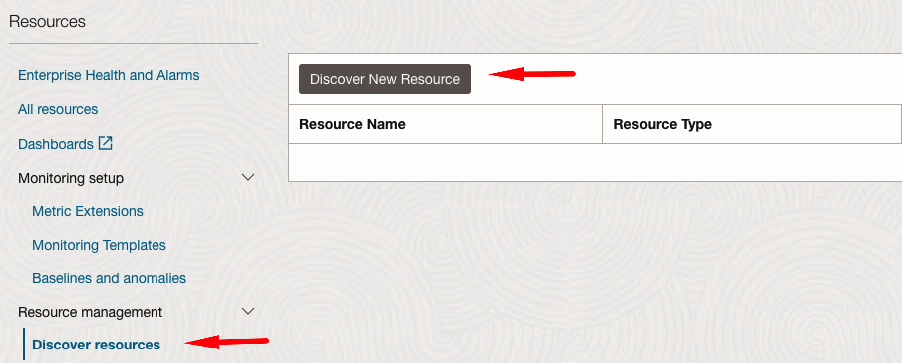
In OCI, navigate to: Observability & Management –> Monitoring –> Stack Monitoring
On the left, select “Discover resources” and right “Discover New Resource”
Enter the required information and start the discovery process.
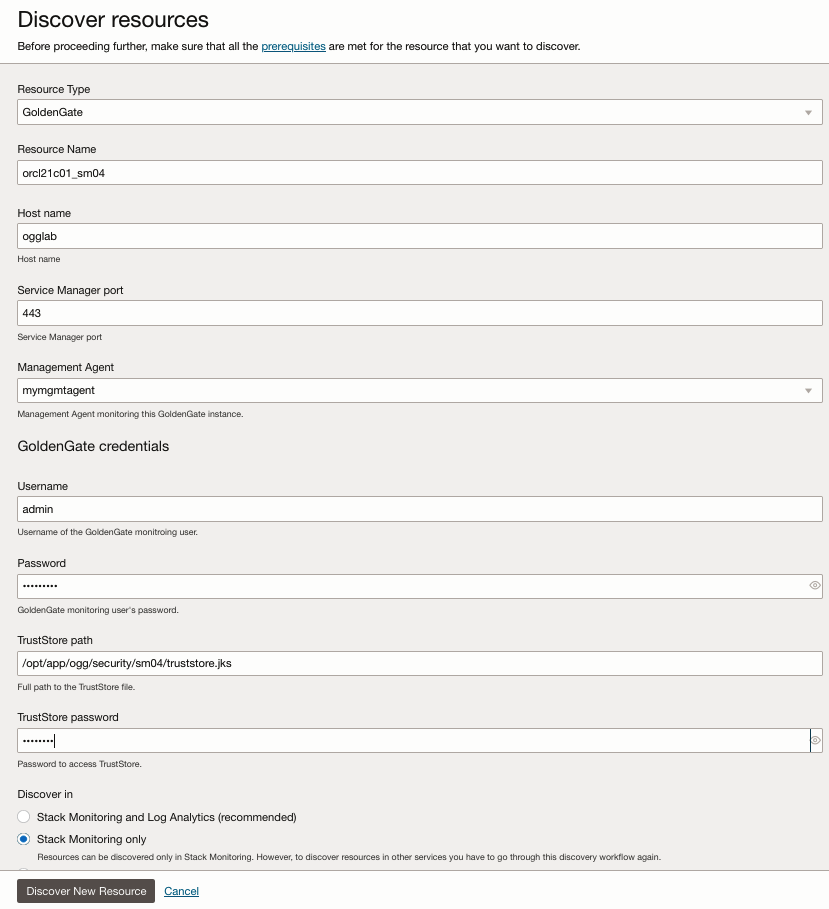
- Resource Type: GoldenGate
- Resource Name: orcl21c01_sm04
- Host name: ogglab
- Service Manager port: 443
- Management Agent: mymgmtagent
- Username: admin
- Password:YOUR PASSWORD
- TrustStore path: /opt/app/ogg/security/sm04/truststore.jks
- TrustStore password: YOUR PASSWORD
- Discover in: Stack Monitoring only
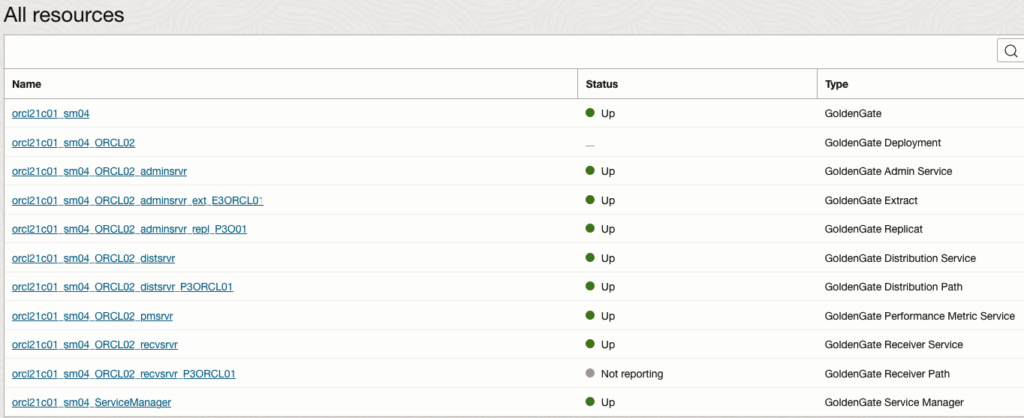
Discovery may take some time, depending on the number of GoldenGate resources.

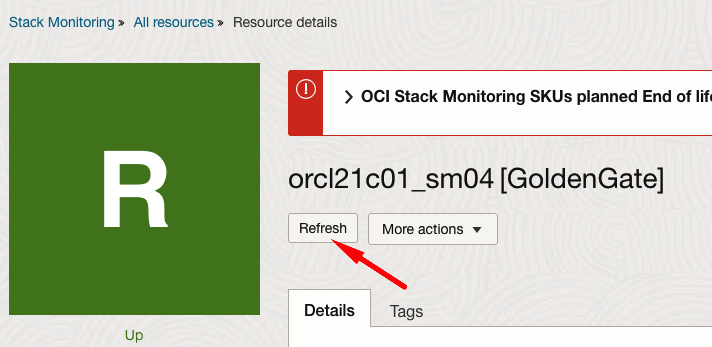
When there is a change in GoldenGate configuration, resources can be refreshed in Stack Monitoring
Using OCI Stack Monitoring
After discovery, OCI Stack Monitoring begins collecting metrics from the GoldenGate environment. Refer to the following documentation for information about available Stack Monitoring metrics and alarms: https://docs.oracle.com/en-us/iaas/stack-monitoring/doc/setting-alarms.html
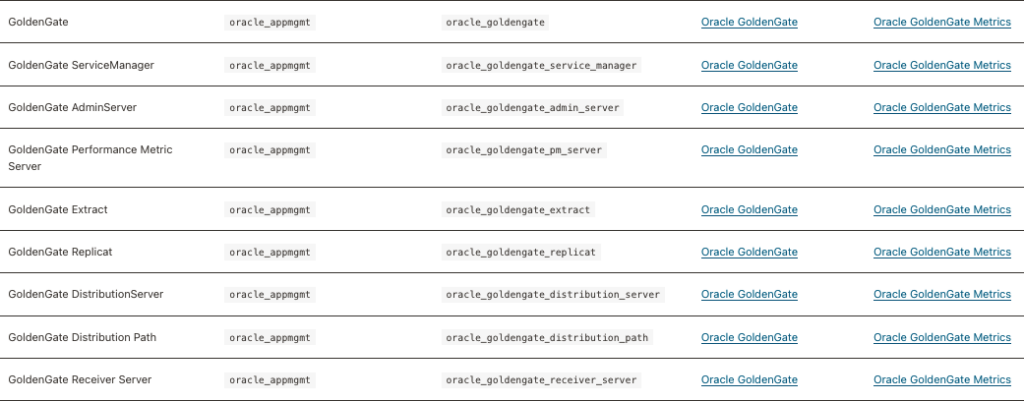
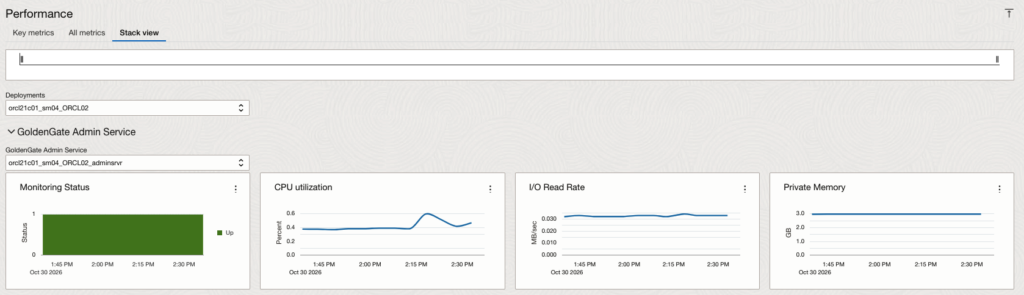
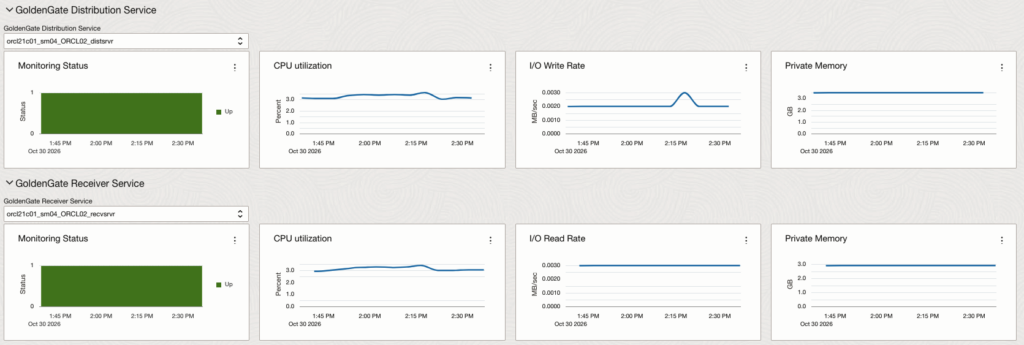
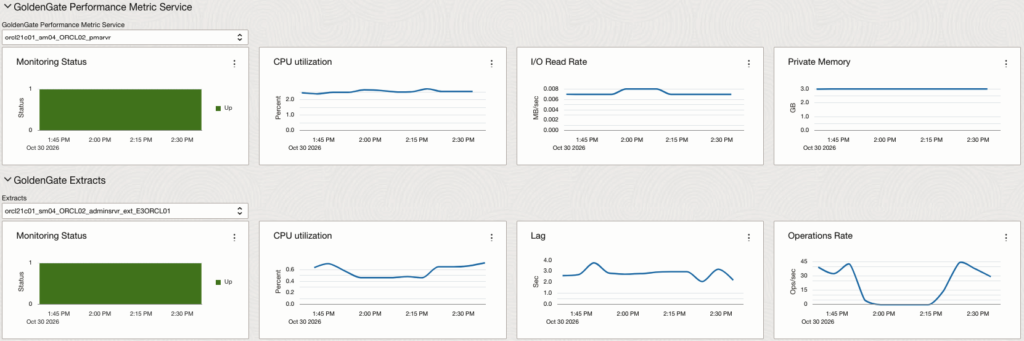
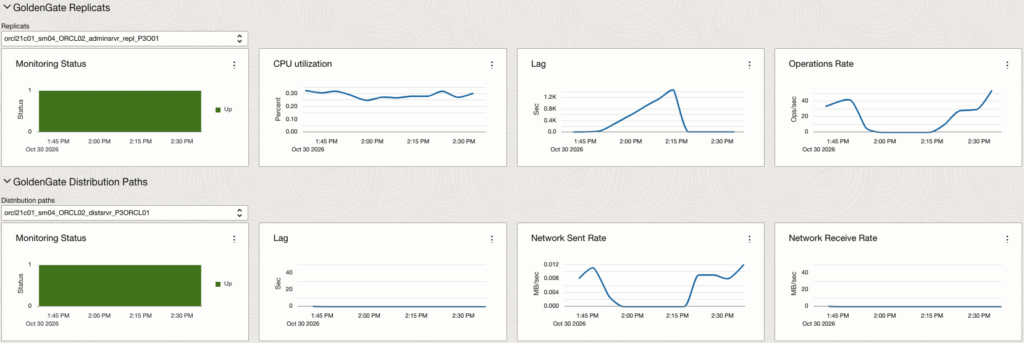
OCI Stack Monitoring provides dedicated resource pages with monitoring information and metric charts. The following screenshots illustrate the monitoring capabilities available for different GoldenGate resources.
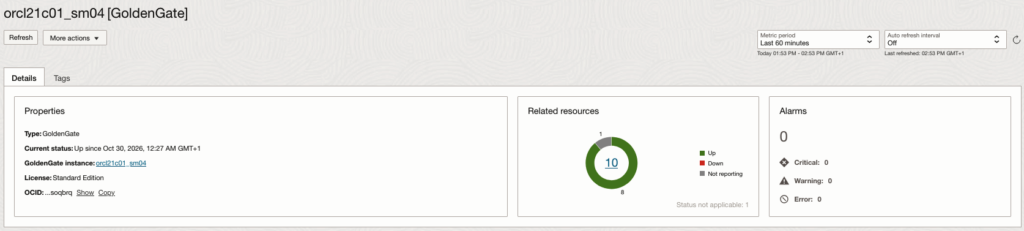
Summary Page
The Summary page provides an overview of the discovered GoldenGate resources and their overall health status. It enables administrators to monitor the operational health of GoldenGate services and replication processes from a centralized view, making it easier to identify resources that may require attention.
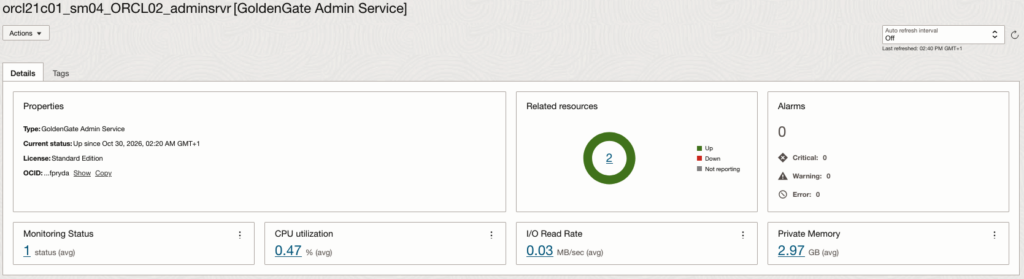
Admin Server
The Administration Server resource page provides visibility into the operational health and performance of the GoldenGate Administration Service. The available monitoring information and metrics help administrators assess service availability and identify potential issues. Similar monitoring pages are also available for other GoldenGate services, including Distribution Service, Receiver Service, and Performance Metrics Service.
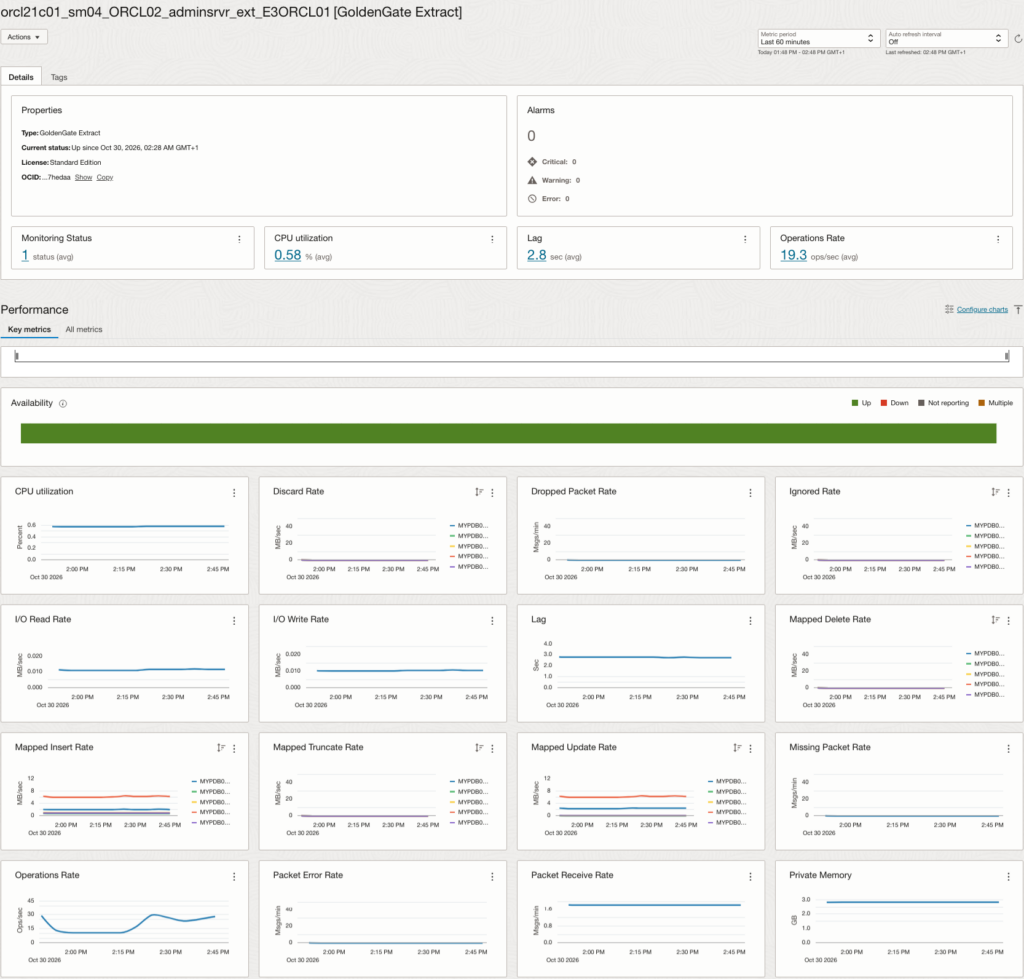
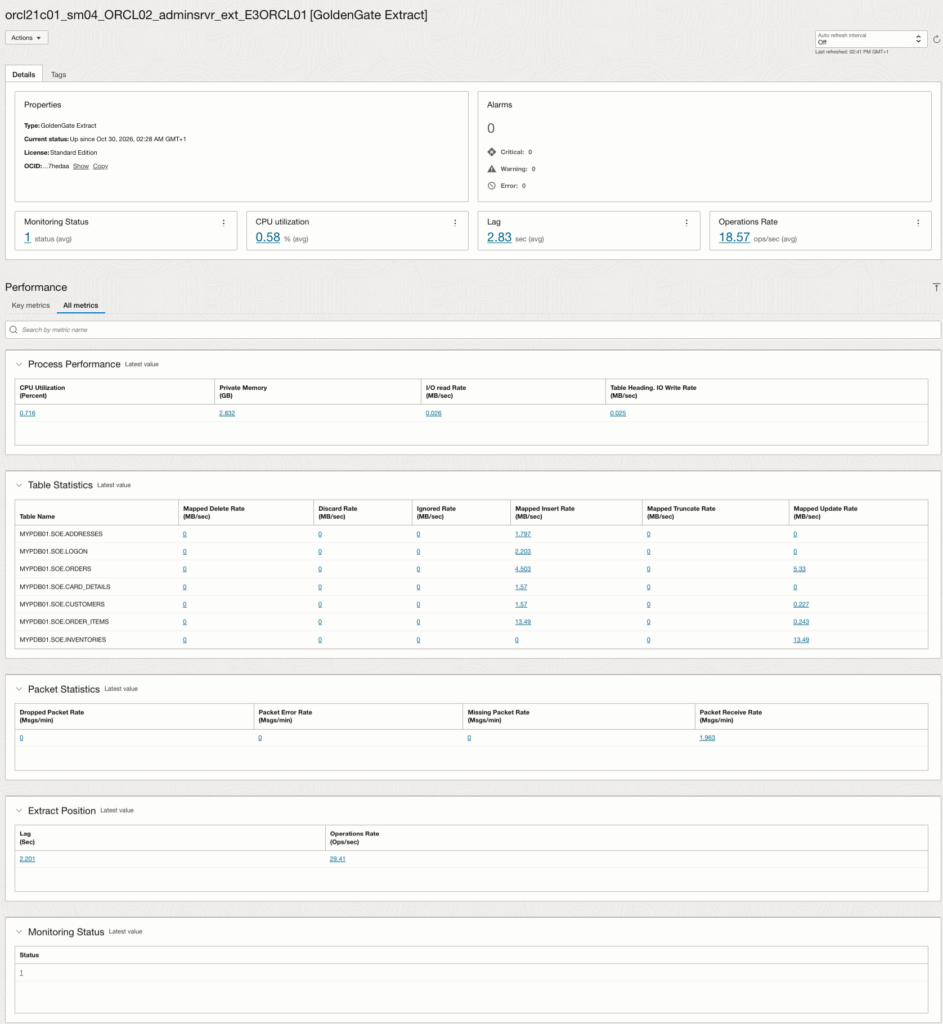
Extract
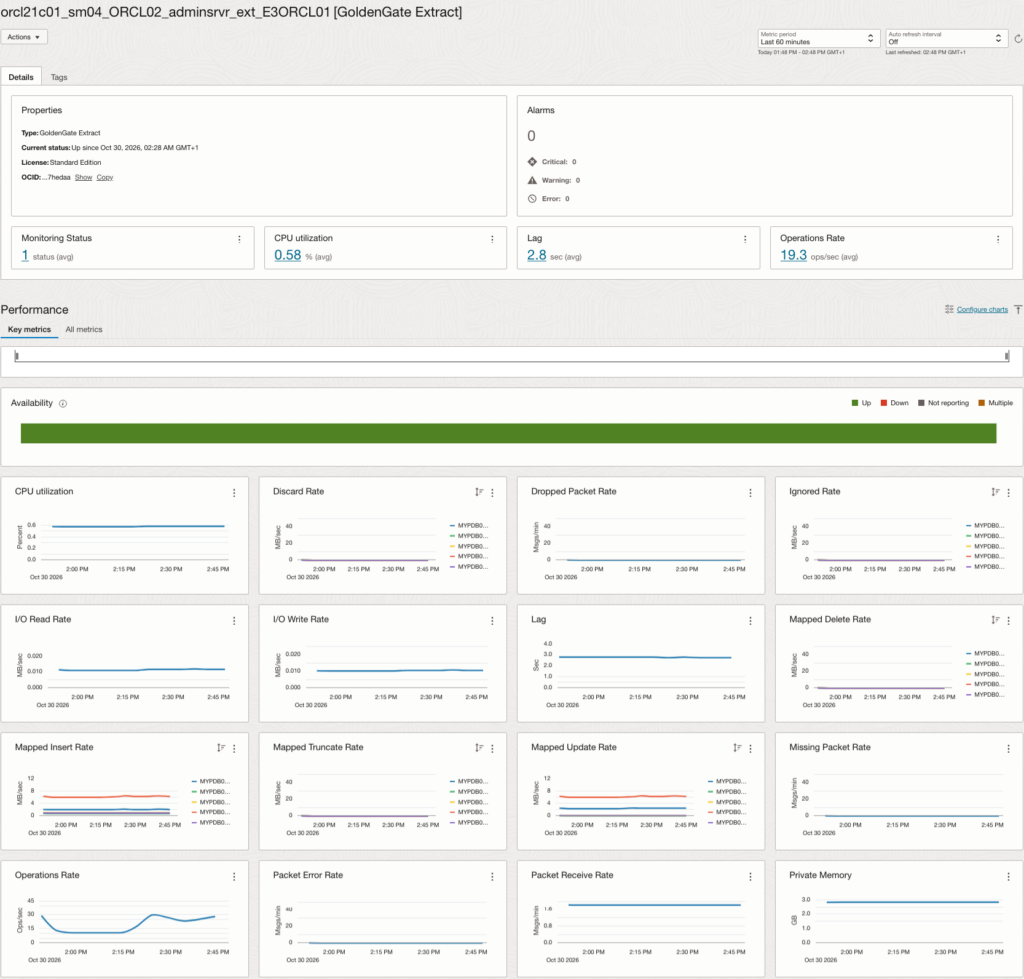
The Extract resource page provides visibility into the operational health and performance of the GoldenGate Extract process. The available metrics and historical charts help administrators observe process behavior and identify potential replication issues.
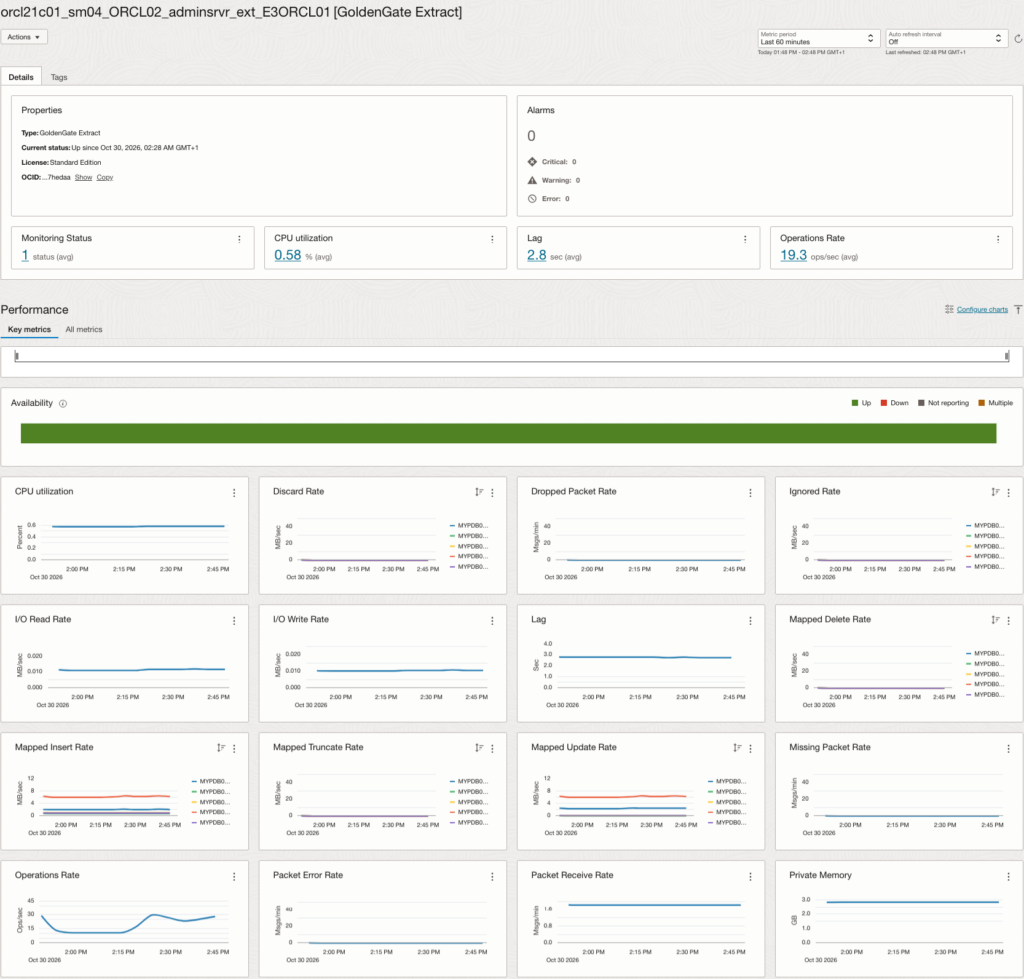
Replicat
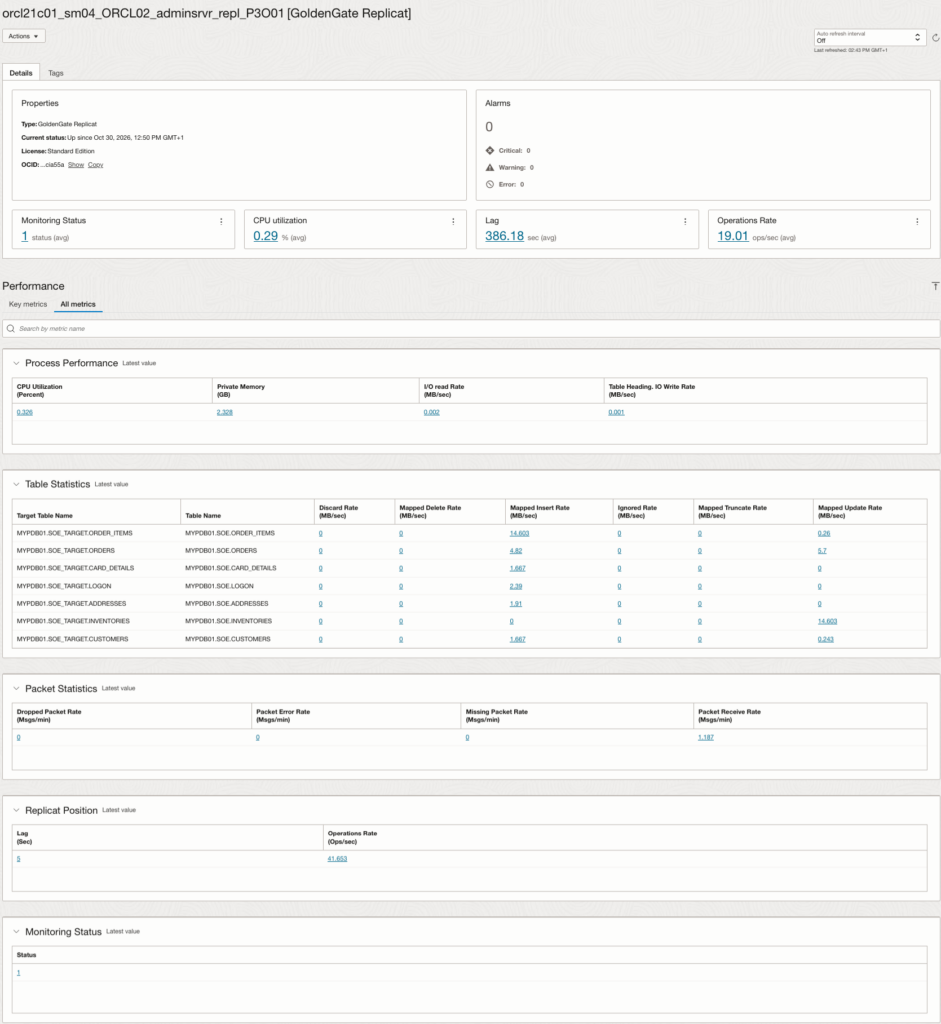
The Replicat resource page provides monitoring information for the GoldenGate Replicat process. Administrators can use the available status information and performance metrics to assess the health of the replication apply process.
Distribution Path
The Distribution Path resource page provides monitoring information for the GoldenGate Distribution Service path. The available charts and metrics help administrators observe data distribution activity and identify potential issues affecting trail delivery.
Conclusion
In this article, we demonstrated how to monitor a non-secure, on-premises Oracle GoldenGate Microservices Architecture deployment using OCI Stack Monitoring.
By configuring an NGINX reverse proxy, we provided an HTTPS endpoint for GoldenGate discovery without modifying the existing non-secure GoldenGate deployment.
After successfully discovering the environment, OCI Stack Monitoring provides centralized visibility into GoldenGate services, Extract and Replicat processes, and Distribution Paths.
This approach can be particularly useful in hybrid environments where on-premises GoldenGate and OCI GoldenGate deployments need to be monitored through a common observability platform.
Although the reverse proxy provides HTTPS connectivity for monitoring, the underlying GoldenGate services remain non-secure. Appropriate network restrictions and security controls should therefore be maintained.